Home -> Render Tree
The Render Tree
The render tree is the structure Cobalt Renderer uses to describe the work required to render a frame. It is not intended to replace an application's own scene graph. Instead, it groups rendering work by the expensive state changes that graphics APIs care about: render pass outputs, shader programs, fixed-function state, resource bindings, and draw inputs. Keeping these groups explicit lets the renderer create and reuse efficient native pipelines while avoiding unnecessary transitions between them.
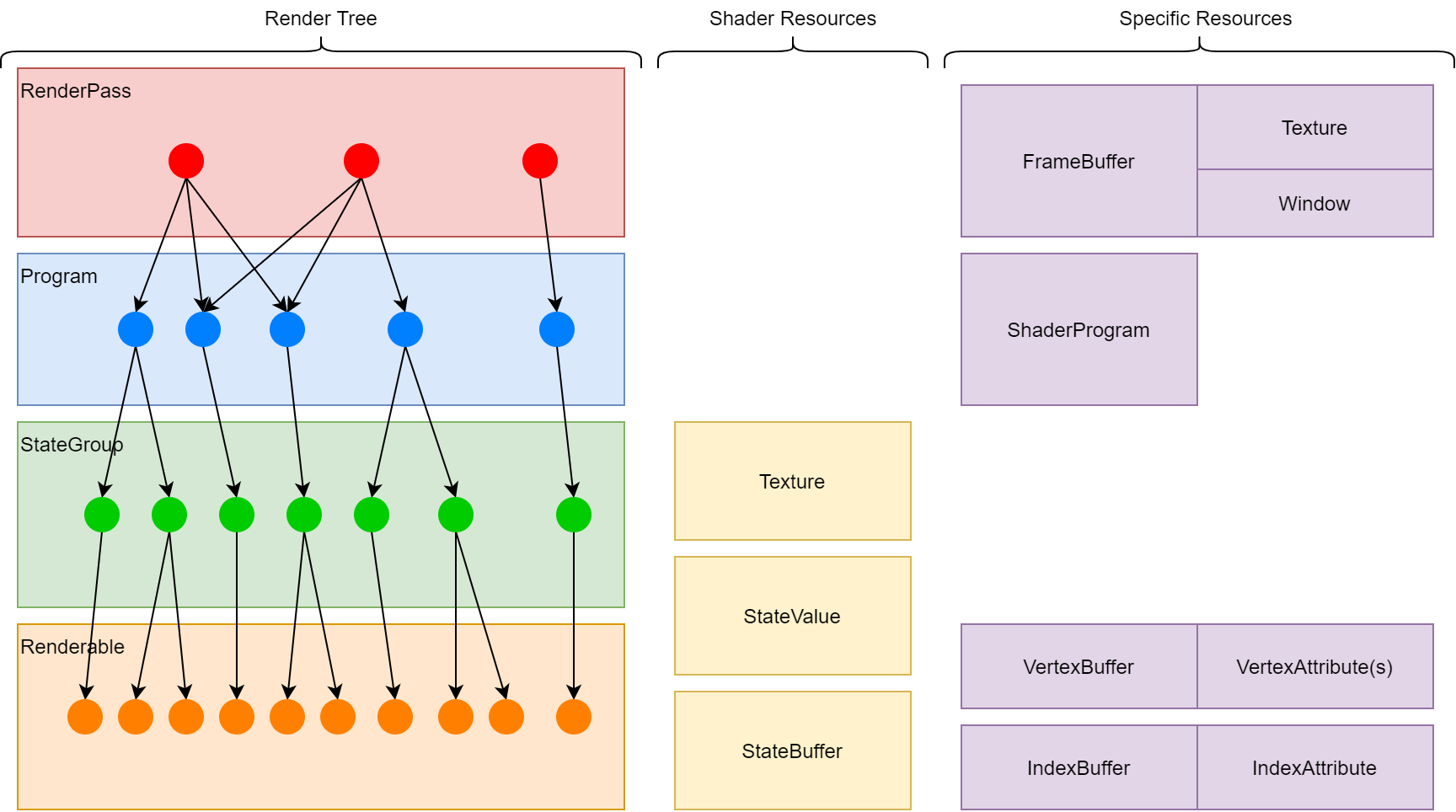
The tree has four levels. A render pass node describes where work is rendered. A program node describes the shader program. A state group node describes fixed-function state and inherited shader resources. A renderable node describes the geometry or indirect draw that is submitted. The diagram below illustrates the four levels and the resources associated with each level.
Render Pass Node
The top level of the tree is the IRenderPassNode. For draw work, a render pass node is bound to an IFrameBuffer that describes the window or texture attachments being rendered into. It also records attachment clear values and load/store behaviour. For compute work, no framebuffer is bound, but a render pass node is still used to place the work in the frame order.
Render pass nodes are submitted to the renderer as an ordered list through SetRenderPasses. That list is the root of the render tree for the next submitted frame.
Program Node
A IProgramNode groups work that uses the same IShaderProgram. Shader programs define the shader stages, shader inputs, and resource names used by child state groups and renderables. Constant state values are also associated with the program, because they can affect native shader compilation or pipeline creation.
A program node can be the child of more than one render pass node. This allows the same shader and child tree to be rendered into multiple passes or windows. Other render tree node types are more restrictive and should be treated as having a single active parent.
State Group Node
A IStateGroupNode describes fixed-function state such as rasterization, depth and stencil tests, culling, polygon fill mode, and blending. It is the usual place to put state that is shared by a set of renderables using the same shader program.
A state group node is added under one program node. Many state group nodes can be added under the same program node, but the same state group node should not be added under multiple parents at the same time. Create another node when the same logical content needs different parentage or state.
Renderable Node
A IRenderableNode is the final draw node. It binds vertex attributes and optional index data to the shader inputs, selects the primitive mode, and may use instance or indirect drawing settings. A renderable is the render tree node that most closely maps to a draw call.
A renderable node is added under one state group node. Many renderables can be added under the same state group, but a renderable cannot be the child of more than one parent concurrently. If the same geometry needs to appear in two branches of the render tree, create a second renderable node that references the same buffers and shader input IDs.
Shader Resources
Shader resources such as state values, state buffers, data arrays, texel arrays, textures, and texture samplers can be bound at different levels of the render tree. Shared values are usually bound high in the tree, such as on a default state object or state group node. More specific values can be bound on a renderable node. When a renderable is drawn, the more specific binding overrides the inherited binding for the same shader resource ID.
Resource names should normally be resolved from the shader program once during setup. Store the returned IDs and use those IDs when changing bindings or values. This keeps the render loop independent from text lookups and makes resource binding failures easier to detect early.
Summary
To recap the basic purpose of each node:
- The render pass node describes the output target and pass order.
- The program node describes the shader program used by child work.
- The state group node describes fixed-function state and shared resource bindings.
- The renderable node describes the geometry, topology, and draw settings.
Nodes can be added, removed, and modified while building future frames. When StartNewFrame is called, the current tree state is latched for drawing and subsequent changes apply to later frames.
Next page, Hello World