Home -> Hello World
Hello World
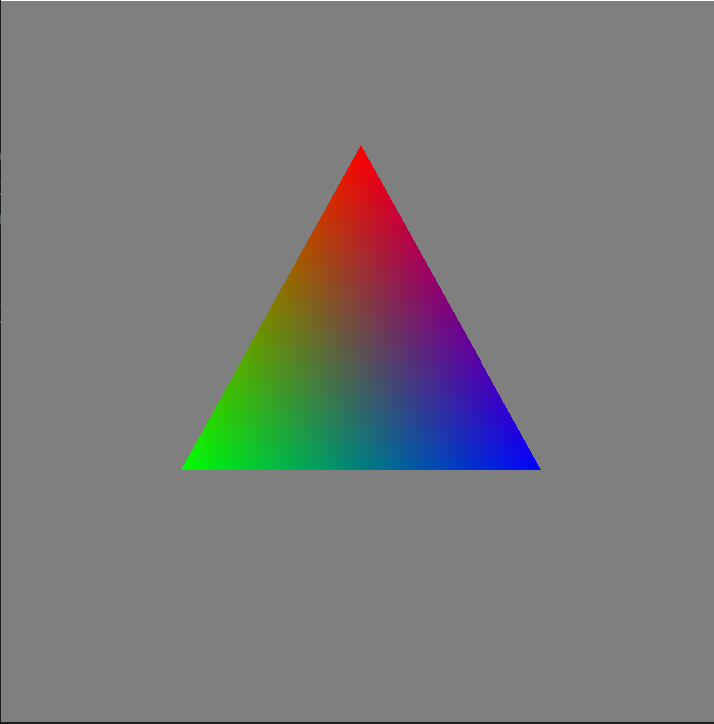
This page walks through a small Cobalt Renderer program that draws a red, green, and blue triangle. Window creation and message pumping are omitted because they depend on the application framework and operating system, but the example shows the renderer setup, render tree setup, shader setup, geometry setup, and frame submission calls involved.
Renderer Setup
The renderer reports errors, warnings, and diagnostic information through the logging system. A console target is enough for this example, although real applications will often add file or application-specific targets as well.
cobalt::logging::LogManager logManager;
logManager.SetIncludeSeverity(cobalt::logging::ILogger::SeverityFilter::All);
auto log = logManager.GetLogger("");

auto consoleLogTarget = cobalt::logging::LogTargetStandardOut::Create(true);
logManager.AddLogTarget(std::move(consoleLogTarget));
Renderer implementations are supplied as plugins. The RenderPluginEnumerator class locates renderer plugins, reads their RendererPlugin records, and can select the preferred renderer for the current system. This avoids hard-coding a particular renderer DLL or shared library in the application.
cobalt::graphics::RenderPluginEnumerator pluginEnumerator(log->GetLoggerChildScope("PluginEnumerator"));
if (!pluginEnumerator.EnumeratePluginsInDirectory(pluginEnumerator.GetProcessDirectory()))
{
    log->Critical("EnumeratePluginsInDirectory failed");
    return 1;
}

std::optional<cobalt::graphics::RendererPlugin> preferredRenderPlugin = pluginEnumerator.GetPreferredPlugin();
if (!preferredRenderPlugin)
{
    log->Critical("Failed to locate a renderer plugin");
    return 1;
}

log->Info("Selected renderer: {0} [{1}]",
    preferredRenderPlugin->GetDisplayName().Get(), preferredRenderPlugin->GetName().Get());
With a plugin selected, create a IGraphicsDeviceEnumerator from its RendererPlugin. The RendererPlugin object keeps the plugin loaded while the enumerator, devices, and renderer objects created from that plugin are being used, so keep it alive for at least as long as those objects. The device enumerator can expose all devices, filter them by type or feature support, or select the preferred device automatically.
const auto& rendererPlugin = *preferredRenderPlugin;
auto deviceEnumerator = rendererPlugin.CreateGraphicsDeviceEnumerator(
    log->GetLoggerChildScope("Renderer"));

if (!deviceEnumerator->EnumerateDevices())
{
    log->Critical("EnumerateDevices failed");
    return 1;
}

cobalt::graphics::IGraphicsDevice* device = deviceEnumerator->GetPreferredDevice();
if (device == nullptr)
{
    log->Critical("Failed to locate a supported graphics device");
    return 1;
}

log->Info("Selected device {0} from vendor {1}",
    device->GetDeviceName().Get(), device->GetVendorName().Get());
The IGraphicsDevice creates the main IRenderer object. The feature set controls optional renderer capabilities that the application intends to use. For this simple example no optional features are required. The window system information structure comes from the PlatformBindings package and must match the platform used for the application window.
std::set<cobalt::graphics::IGraphicsDevice::Feature> enabledFeatures;
std::set<cobalt::graphics::IRenderer::Options> enabledOptions;

auto renderer = device->CreateRenderer(enabledFeatures, enabledOptions);

cobalt::graphics::WindowSystemInfoWin32 windowSystemInfo;
if (!renderer->Initialize(windowSystemInfo, cobalt::graphics::IRenderer::InitializationFlags::None))
{
    log->Critical("Failed to initialize renderer");
    return 1;
}
Render Pass Node
Before creating the IRenderPassNode, create an IFrameBuffer to render into. This example assumes that the application has already created a Win32 window and has an HWND. Other platforms use their corresponding WindowInfo structure from PlatformBindings.pkg.
The call to BindWindow must be made on the UI thread required by the active window system. The exact way to marshal work onto that thread depends on the platform and application framework, so it is not shown here. Resize notifications sent through NotifyWindowResized have the same requirement.
auto frameBuffer = renderer->CreateFrameBuffer();
cobalt::graphics::WindowInfoWin32 windowInfo(
    windowHandle, cobalt::graphics::V2UInt32(WIDTH, HEIGHT));

if (!frameBuffer->BindWindow(
    windowInfo,
    cobalt::graphics::IFrameBuffer::WindowDepthStencilMode::DepthFloat32,
    cobalt::graphics::IFrameBuffer::WindowColorSpaceMode::Default))
{
    log->Critical("Failed to bind window");
    return 1;
}

frameBuffer->DefineViewportRegion(
    cobalt::graphics::V2UInt32(0, 0), cobalt::graphics::V2UInt32(WIDTH, HEIGHT));
The render pass node binds the framebuffer and describes how the attachments are prepared before drawing. Here the colour attachment is cleared to grey and the depth attachment is cleared to the far depth value.
auto renderPassNode = renderer->CreateRenderPassNode();
renderPassNode->BindFrameBuffer(frameBuffer.get());
renderPassNode->SetAttachmentClearData(
    cobalt::graphics::IFrameBuffer::AttachmentType::Color, 0,
    cobalt::graphics::V4Float32(0.5f, 0.5f, 0.5f, 1.0f));
renderPassNode->SetAttachmentClearData(
    cobalt::graphics::IFrameBuffer::AttachmentType::Depth, 0,
    cobalt::graphics::V4Float32(1.0f, 0.0f, 0.0f, 0.0f));
The renderer receives an ordered list of render passes. This example has only one render pass.
cobalt::graphics::IRenderPassNode* renderPasses[] = { renderPassNode.get() };
renderer->SetRenderPasses(renderPasses, 1);
Program Node
The shaders for this example are deliberately small. The vertex shader forwards the vertex position and colour, and the fragment shader writes the interpolated colour to the first render target. They are written in HLSL, which is the recommended shader language for Cobalt Renderer applications.
struct VSInput
{
    float4 position : position;
    float3 color : color;
};

struct VSOutput
{
    float4 position : SV_POSITION;
    float3 color : COLOR;
};

VSOutput main(VSInput IN)
{
    VSOutput OUT;
    OUT.position = IN.position;
    OUT.color = IN.color;
    return OUT;
}
struct VSOutput
{
float4 position : SV_POSITION;
float3 color : COLOR;
};
float4 main(VSOutput IN) : SV_TARGET0
{
return float4(IN.color, 1.0f);
}Load each shader stage into an IShaderProgram, then compile the complete program. Compilation should always be checked, because shader translation or native shader compilation can fail on the target renderer.
auto shaderProgram = renderer->CreateShaderProgram();

if (!shaderProgram->LoadShaderStage(
    cobalt::graphics::IShaderProgram::ShaderStage::Vertex,
    cobalt::graphics::ShaderSourceInfoHLSL(vertexShaderCode)))
{
    log->Critical("Failed to load vertex shader");
    return 1;
}

if (!shaderProgram->LoadShaderStage(
    cobalt::graphics::IShaderProgram::ShaderStage::Fragment,
    cobalt::graphics::ShaderSourceInfoHLSL(fragmentShaderCode)))
{
    log->Critical("Failed to load fragment shader");
    return 1;
}

if (!shaderProgram->CompileProgram())
{
    log->Critical("Failed to compile shader program");
    return 1;
}
The compiled shader program is bound to a IProgramNode. Program nodes group all render tree content that uses the same shader program.
auto programNode = renderer->CreateProgramNode();
if (!programNode->BindShaderProgram(shaderProgram.get()))
{
    log->Critical("Failed to bind shader program");
    return 1;
}

renderPassNode->AddChildNode(programNode.get());
State Group Node
A IStateGroupNode contains fixed-function pipeline state such as fill mode, depth testing, culling, and blending. A single triangle does not strictly need depth testing, but enabling depth testing here shows the normal pattern for a pass that owns a depth attachment.
auto stateGroupNode = renderer->CreateStateGroupNode();

stateGroupNode->SetPolygonFillMode(cobalt::graphics::IStateGroupNode::PolygonFillMode::Solid);
stateGroupNode->SetDepthTestEnabled(true);
stateGroupNode->SetDepthWriteEnabled(true);

programNode->AddChildNode(stateGroupNode.get());
Vertex Buffer
The triangle uses three vertices. Each vertex has a position attribute and a colour attribute. Attribute objects describe the type, count, CPU access pattern, and GPU access pattern of the data before it is allocated in a vertex buffer.
std::vector<cobalt::graphics::V4Float32> positionVertexData({
    {0.0f, 0.6f, 0.5f, 1.0f},
    {-0.5f, -0.3f, 0.5f, 1.0f},
    {0.5f, -0.3f, 0.5f, 1.0f}
});

std::vector<cobalt::graphics::V3Float32> colorVertexData({
    {1.0f, 0.0f, 0.0f},
    {0.0f, 1.0f, 0.0f},
    {0.0f, 0.0f, 1.0f}
});
using cobalt::graphics::IVertexAttribute;
cobalt::graphics::VertexAttribute<cobalt::graphics::V4Float32> positionAttribute(
positionVertexData.size(),
IVertexAttribute::PerformanceHint::WriteNever | IVertexAttribute::PerformanceHint::ReadNever,
IVertexAttribute::PerformanceHint::WriteNever | IVertexAttribute::PerformanceHint::ReadOften);
cobalt::graphics::VertexAttribute<cobalt::graphics::V3Float32> colorAttribute(
colorVertexData.size(),
IVertexAttribute::PerformanceHint::WriteNever | IVertexAttribute::PerformanceHint::ReadNever,
IVertexAttribute::PerformanceHint::WriteNever | IVertexAttribute::PerformanceHint::ReadOften);Bind the attributes to a IVertexBuffer, assign the initial data, and allocate the buffer. Initial data is uploaded as part of allocation, which is the most direct path for static geometry.
auto vertexBuffer = renderer->CreateVertexBuffer();

if (!vertexBuffer->BindVertexAttribute(positionAttribute) ||
    !positionAttribute.SetInitialData(positionVertexData) ||
    !vertexBuffer->BindVertexAttribute(colorAttribute) ||
    !colorAttribute.SetInitialData(colorVertexData) ||
    !vertexBuffer->AllocateMemory())
{
    log->Critical("Vertex buffer could not be allocated");
    return 1;
}
Renderable Node
A IRenderableNode represents the draw operation. It binds vertex attributes to shader inputs by ID rather than repeatedly resolving string names during rendering. Resolve shader names once during setup, keep the returned IDs, and reuse those IDs when building or updating renderables.
auto positionAttributeId = shaderProgram->GetVertexAttributeId("position");
auto colorAttributeId = shaderProgram->GetVertexAttributeId("color");

auto renderable = renderer->CreateRenderableNode();
if (!renderable->BindVertexAttribute(positionAttribute, positionAttributeId) ||
    !renderable->BindVertexAttribute(colorAttribute, colorAttributeId) ||
    !renderable->SetPrimitiveMode(cobalt::graphics::IRenderableNode::PrimitiveMode::Triangles))
{
    log->Critical("Failed to create renderable");
    return 1;
}

stateGroupNode->AddChildNode(renderable.get());
Render Loop
Calling StartNewFrame advances the current build state to the draw phase. The call may return before the GPU work is complete, allowing the application to prepare later frames while the current frame draws. As described in the Threading Model, this call must be externally synchronized so that no other API call on the renderer or objects created from it is running concurrently.
while (!shouldClose)
{
    renderer->StartNewFrame();
}
Conclusion
This produces an RGB triangle in the window. More complex scenes follow the same pattern: select a renderer and graphics device, create framebuffer and render pass outputs, compile shader programs, group compatible state in the render tree, and submit frames through StartNewFrame.
Next page, Draw and Build Phases