Home -> Background
Background
Users should be familiar with the core concepts of modern computer graphics. Detailed knowledge of every native graphics API is not required, but concepts such as vertex buffers, shaders, textures, framebuffers, render passes, and pipeline state are important when working with the Cobalt Renderer API.
The following resources are useful introductions to modern graphics programming:
- Learn OpenGL: https://learnopengl.com (particularly the "Getting Started" and "Advanced OpenGL" sections)
- Learning Modern 3D Graphics Programming: https://paroj.github.io/gltut/index.html
Terminology
Cobalt Renderer is built on several graphics APIs, and those APIs often use different names for similar concepts. The table below gives a broad mapping for common terms. It is not intended to imply that each Cobalt object maps to exactly one native object on every backend; the renderer may combine, split, or emulate concepts internally.
| Cobalt Renderer | OpenGL | Vulkan | Direct3D | Metal |
| Shader Program | Program | Pipeline shader stages | Shader bytecode in pipeline state | Render or compute pipeline functions |
| State Value | Uniform | Push constant or uniform-backed value | Root constant or constant buffer value | Constant address-space value |
| Constant State Value | N/A | Specialization constant | N/A | Function constant |
| State Buffer | Uniform buffer | Uniform buffer | Constant buffer | Buffer in constant address space |
| Data Array | Shader storage buffer | Storage buffer | StructuredBuffer or RWStructuredBuffer | Buffer in device address space |
| Texel Array | Buffer texture or image buffer | Texel buffer or storage texel buffer | Buffer or RWBuffer | Typed buffer representation |
| Framebuffer | Framebuffer or default framebuffer | Render pass attachments | Render target and depth stencil views | Render pass descriptor attachments |
Graphics Pipeline
The graphics pipeline is at the heart of real-time rendering. Most renderer resources either provide input data to a pipeline, configure how the pipeline runs, or receive the pipeline output. A texture can be read by shaders, a framebuffer receives colour or depth output, and a render pass describes a collection of work targeting those outputs. Compute work is also supported, but it has a simpler pipeline because it does not rasterize primitives or render into a framebuffer.
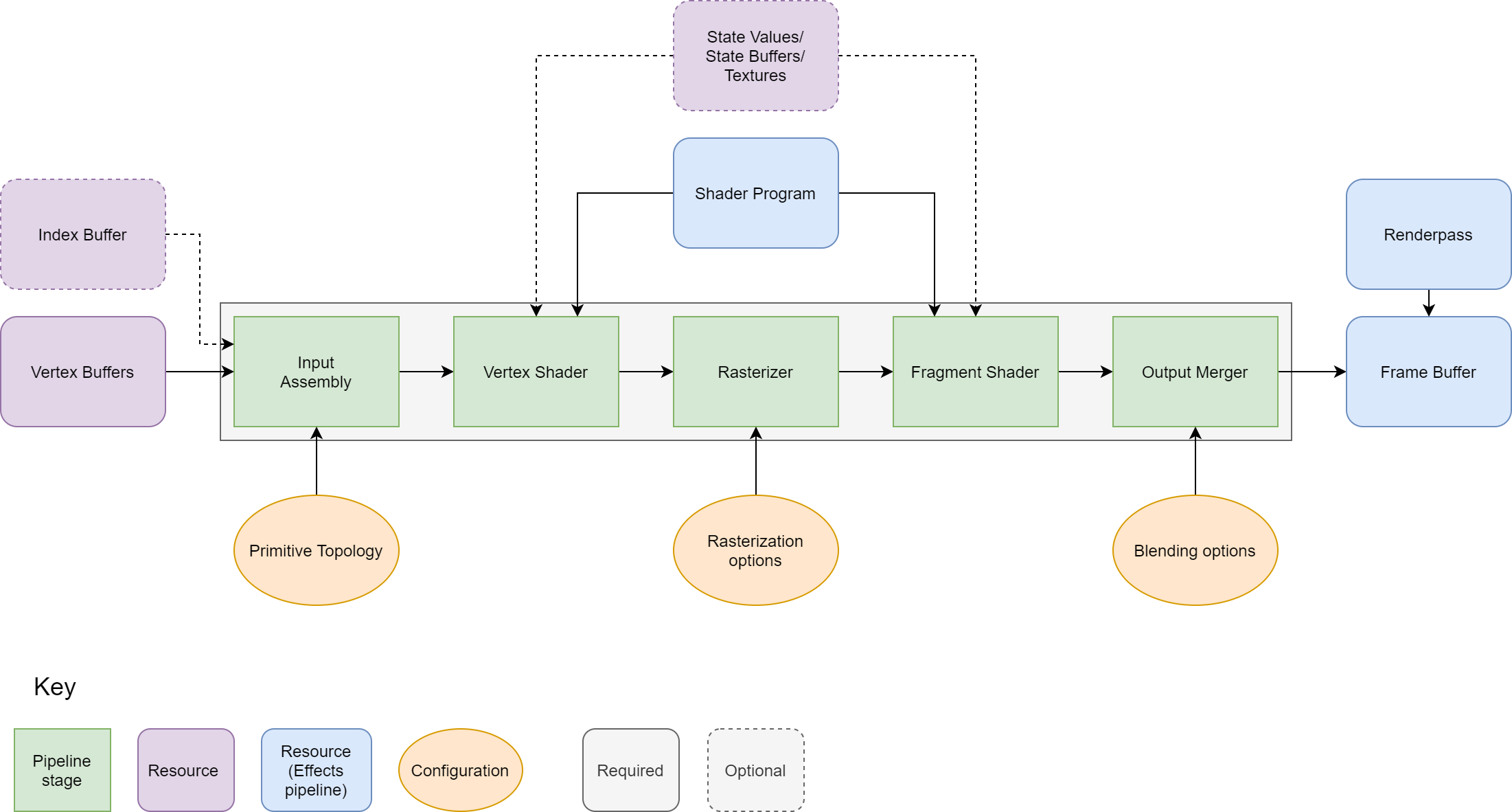
The most important pipeline inputs and configuration are:
- Shader program: The shader stages used by the pipeline. Draw pipelines require vertex and fragment stages. Geometry stages are optional, and compute pipelines use a compute stage instead.
- Render pass and framebuffer: The output textures or windows for draw work, and the clear, load, and store behaviour for those attachments.
- Vertex and index buffers: The geometry data processed by the vertex stage.
- Primitive topology: The way vertex or index data is assembled into points, lines, or triangles.
- Rasterization state: The way primitives are converted into fragments, including fill and culling options.
- Depth, stencil, and blending state: The tests and merge operations applied to generated fragments.
- Shader resources: State values, state buffers, textures, samplers, data arrays, and texel arrays visible to shaders.
Many state changes can require a different native pipeline. Changing shader programs, attachment formats, sample counts, primitive topology, or depth, stencil, blending, and rasterization settings may require the renderer to create or bind a different pipeline. Updating the contents of a state value, buffer, or texture is usually much cheaper than changing the pipeline structure itself.
The Cobalt Renderer render tree is designed to minimise unnecessary pipeline transitions while still allowing the application to manage its own scene in whatever way fits. It is normal to keep a logical scene graph, entity system, or application-specific object model separate from the render tree. The same logical scene object may map to more than one renderable node when it is drawn into multiple windows, multiple render passes, or multiple views.
Next page, Render Tree